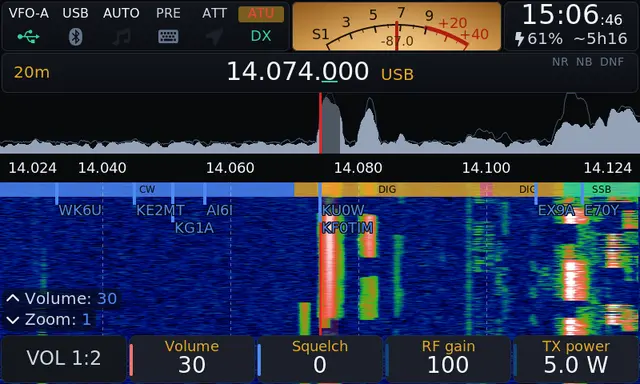
OpenX6X00 is a Linux-side firmware replacement for the Xiegu X6100 and X6200. It is a fork of the last open-source release (v0.127) of the IU1WXY firmware, which itself builds on the R1CBU GUI. It is maintained by Joeri ON6URE (RF.Guru). The GUI is LGPL-2.1-or-later; the image as a whole is GPLv3 because of the JS8, WSPR and JTTY components.
This post summarizes what it does, how it installs, and where the rough edges are, based on the project’s own documentation and release notes. We have not independently tested it on the air.
Covers v0.3.9, released 6 November 2026. Source: github.com/Guru-RF/OpenX6X00. Project page: openx6x00.org.
Background
The X6100 community firmware started with Oleg Belousov R1CBU and Georgy Dyuldin R2RFE (the R1CBU GUI), and was extended by Giovanni Ricciardi IU1WXY with digital modes, Field Ops, a DX cluster client, themes and Bluetooth. IU1WXY’s v0.127 (17 October 2026) was the last release with source. From v0.128 the firmware is distributed as closed binaries under its own terms, with an update channel and optional account on x6100-link.it. That is the author’s decision to make.
OpenX6X00 continues from v0.127 under the original licence with copyright notices intact. It also adds X6200 support from the same source tree, using Aether Radio’s open X6200 buildroot and control library.
How it installs
The firmware runs from the microSD card. Nothing is written to the radio’s internal memory, so returning to Xiegu’s firmware means putting the original card back.
- Download the
-sdcard.img.zipfor your radio (X6100 or X6200, about 106 MB zipped, about 570 MB written) from GitHub Releases. - Write it to a branded 8 to 32 GB card with balena Etcher, keeping the zip as is.
- Boot the first time on external power and allow about a minute. A DATA partition for settings and logs is created in the remaining space.
After that, updates come from the radio itself (Settings › Info › Update, or the web configurator). Each release carries a bundle signed with ECDSA P-256 with a SHA-256 per file. The radio keeps the previous version and reverts automatically if the new GUI crashes three times in its first minute; an install interrupted by a power loss is undone at next start. A new card image is only needed when the kernel, a driver or the boot loader changes, and the radio tells you when that is the case. Back up from the web configurator before writing a new image.
Features
Digital modes on the radio
FT8, FT4, FT2, JS8 (all four speeds), WSPR decode and beacon, PSK31, PSK63, Olivia, Contestia, JTTY, RTTY, SSTV in and out, WeFax and NavTex, plus a CW decoder. No PC or sound-card cable is involved.
CW
CW decoder, typing from a USB or Bluetooth keyboard, a message keyer with macros, USB and Bluetooth paddle support, a Koch-method trainer, QRSS3 (3 s dot) on a per-band QRSS frequency, and a CW beacon with a defined start and end.
DX cluster
Spots are drawn on the waterfall, in a side column and in a full app. Filters cover mode, band, activity and spotter country. Fifteen public telnet clusters are built in, and the radio connects directly to the one you pick. POTA, WWBOTA, HOTA and LLOTA activators appear in the same list.
Winlink over HF
Pat runs on the radio with ARDOP as the modem through the radio’s audio path; the mailbox is a web page you open from a phone or laptop on the same network. No PC or internet is needed to operate. Gateway selection shows band and distance, and the radio tunes to USB-D, keys at up to 7 W, identifies in CW and tunes back. Mercury (v0.3.7) and XARA (v0.3.9, speaks VARA HF so VARA gateways can answer it) are included as experimental modems. Both have only been tested between PCs so far, not on the air from a radio.
Field Ops
A portable-operation interface with large touch targets. It supports eleven programmes: SOTA, POTA, WWBOTA, HOTA, WWFF, TOTA, WCA, MOTA, lighthouses (ARLHS), Tiles on the Air and LLOTA. It selects the nearest references from GPS or locator using lists stored on the card (so it works offline after the lists are fetched), logs to ADIF with the appropriate MY_SIG/SIG_INFO fields, and counts the activation threshold for each programme. Spotting for most programmes goes through your DX cluster login.
Band plan
Selectable IARU Region 1, 2 or 3, or US sub-bands by licence class (from 47 CFR Part 97 as of October 2026). “Auto” selects the region from GPS, locator or callsign, and never selects a US plan because it can’t know the licence class. Mode can follow the band plan. This is guidance only; the radio does not enforce your licence privileges.
Other radio-side items
- 3D band scope (last 6 s of spectrum in perspective), on by default, can be turned off.
- Independent VFOs, Birdie Cal, per-band TX shift for repeaters and QO-100 transverter setups, TX power limit per transverter.
- TUNE for an external tuner: a low-power carrier (1 W default, up to the radio’s maximum, 15 s). Above 1 W the internal ATU is bypassed. Tested on the bench at 1 W and 10 W, not yet with a real tuner.
- SWR scan up to 2500 kHz span, limited to the amateur band by default.
- Frequency lock independent of the apps’ own hold.
- Wavelog upload of every logged QSO (contributed by DF8MH), QRZ Logbook upload, PSK Reporter, WSPRnet.
- Themes, a screensaver, and a user-supplied boot image.
Remote operation
Browser Panel and Screen pages
The radio serves two pages. Panel is a touch-oriented control surface with spectrum and waterfall, tap-to-tune, spots and the FT8 app. Screen streams the radio’s own display with its keys and knobs. Both carry RX audio, and the microphone for TX over HTTPS. Anyone on the network can watch; operating requires pairing a browser with a six-digit code shown on the radio, and only one holder controls the RF side at a time (browser, TCI client, or the operator at the radio, who always has priority). A held PTT is a lease: the radio unkeys after three seconds without contact from the page, with a three-minute maximum.
TCI v2.0 server
The radio exposes TCI on port 50001, covering frequency, mode, filter, AGC, RIT, drive, PTT, meters and audio in both directions. WSJT-X and JTDX connect as rig “TCI Client RX1” with CAT and audio over one connection, so no sound card or CAT cable is needed. The project reports testing against a replay of WSJT-X’s TCI client, not against live WSJT-X installs, and asks for reports. The VFO-Knob (from the same maintainer) also uses TCI.
Away from home
Tailscale can be enabled on the radio (userspace mode, as the kernel has no TUN device), which makes the configurator, Panel, Screen and TCI reachable over your tailnet without opening router ports. Tailscale Funnel can expose only the Panel and Screen pages to the public internet for browsers already paired at home; the configurator, TCI, Pat, SSH and rigctld are never exposed. Funnel has been tested against a stand-in of tailscaled and the PC build, not yet on a real tailnet.
A USB Ethernet adapter is supported and recommended over the radio’s WiFi for remote use; the project built and tested it with the Delock 81570 on both radios.
X6200 specifics
The X6200 runs the same GUI and apps. Items specific to it:
- SAM and WFM modes, FM broadcast and airband receive.
- PWR limited to 8 W on external power and 5 W on battery.
- Transmit power holds from v0.3.4 on base firmware 1.0.7 and 1.0.8, measured into a dummy load (about 4.9 to 5.0 W at 5 W for AM, FM, FT8 and digital).
- H-22 hand mic keys, from a key-code table by ea4iln-debug. The hand mic’s audio is not yet verified.
- v0.3.9 adds WR12 receiver support on the HOST port (54 MHz to 1 GHz, receive only).
- Split and TX shift work for the apps, SWR scan, voice messages and TCI audio, but not yet for the PTT key, CW or the hand mic.
What changed in v0.3.9
- TX restricted to amateur bands by default (ITU Regions 1, 2 and 3 in a single table, including wider national allocations). Previously the radio would transmit anywhere from 0.1 to 55 MHz. If you are licensed outside the amateur bands, the override is under Settings › TX Cal › TX PROTECTION. The X6100’s two transverters are now off by default; if you relied on them, re-enter the shift (116 MHz for 2 m, 404 MHz for 70 cm).
- X6200 TX lockout in the base itself outside its band table where the radio refuses TX, which covers the hand mic PTT, VOX and KEY jack. The relevant byte (280 of the base’s calibration block) was found by ea4iln-debug; checked with a wattmeter on a dummy load.
- The X6200’s own PA bias is now read from the base, as Xiegu’s firmware does. v0.3.4 to v0.3.8 sent every X6200 another radio’s value. After updating from v0.3.8, power-cycle the radio once.
- CapsLock-held shortcuts on a USB or Bluetooth keyboard (L logs a QSO, K locks the dial, P takes a screenshot, Space toggles PTT). The F keys no longer do anything.
- X6200 battery: the radio now switches itself off at 6.8 V before the base cuts power without saving. This was verified in a host test only.
- Fixes: a PTT that stayed on after two simultaneous keypresses, FT8 QSOs lost when moving on, and LoTW treating the ADIF as duplicates.
- Other additions: Contestia presets, the Amber Trey theme, and the X6200 FT8 library update so that CQ with a long or compound callsign is sent as a CQ (checked on the PC and the update path, not on the air).
Known issue: on an X6100 with base 1.1.9, the waterfall draws your own CW a key tone below the line (#191). On base 1.1.8 it sits on the line.
Baseband firmware
OpenX6X00 does not touch the radio’s baseband (DSP, RF, power, keyer). X6100 bases V1.1.8 and V1.1.9 work, as does gdyuldin’s x6100_base_patch r13 (which adds TX audio options such as CESSB and band output gain). On a radio that shipped with V1.1.8, the project saw power about 10% high before calibration with that patch, occasional near-zero power on the first transmission after a band change, and the external voltage reading 0 V. X6200 bases 1.0.7 and 1.0.8 both work. Version 0.3.0 to 0.3.3 lose transmit power about a second into a transmission on the X6200; v0.3.4 fixed that.
Network exposure and security
The project is explicit about this, and you should read it before putting the radio on a shared network:
- The TCI server has no authentication (the protocol has none). Set clients to Listen only, or turn it off, on any network you don’t control.
- The web configurator has no login. Neither does Winlink’s Pat mailbox when enabled, which can send mail and key the radio under your callsign.
- With Tailscale on, everyone on your tailnet has the same access as someone on your LAN.
- SSH is key-only. Password login is disabled.
- If you are on v0.3.7 or older with Winlink enabled: a received message could carry content that ran as script in Pat’s mailbox. Fixed in v0.3.8; update before opening mail from unknown senders.
The project reports two independent code audits of its own tree (22 findings on 22 October, 17 on 24 October 2026) plus a review of v0.3.6 (14 findings), all with fixes committed and the reports kept in the repository under docs/audit. These are the project’s own claims. They are worth reading, but they are not a substitute for your own judgment about a firmware that can key a transmitter.
Network traffic
OpenX6X00 operates no server. The radio contacts only the services you enable:
- GitHub Releases, when you check for updates (the firmware version is sent with the request).
- Your chosen DX cluster, PSK Reporter (UDP), pota.app, wwbota.org, cqhota.app, spots.wwff.co, WSPRnet, QRZ Logbook, and your own Wavelog.
- Winlink (winlink.org) when Winlink is on and the radio is online; Tailscale when you enable it (log upload and its DNS are off); public NTP.
The project contrasts this with the IU1WXY firmware from v0.128 onward, which per that firmware’s own v0.130 notice sends a radio ID, version, use counters and an integrity check to x6100-link.it and routes cluster and PSK Reporter spots through that site, with a privacy setting to limit it.
Comparison with the IU1WXY firmware
Per each project’s own pages as of 6 November 2026 (the IU1WXY side from x6100-link.it, v0.131):
| Item | OpenX6X00 v0.3.9 | IU1WXY v0.131 |
|---|---|---|
| Radios | X6100, X6200 | X6100 |
| Source | Open (LGPL-2.1+ GUI, GPLv3 image) | Proprietary since v0.128; GPL parts’ source provided with v0.131 |
| Download | GitHub Releases, no account | x6100-link.it, free account |
| Remote access | Browser Panel/Screen pages, TCI, Bluetooth CAT | Paid Android app, receive-only browser page, wfview server, Bluetooth CAT |
| Field Ops programmes | 11 | SOTA, POTA |
| Winlink on the radio | Pat + ARDOP; Mercury and XARA experimental | Not documented |
Limitations to be aware of
- Several v0.3.9 items are marked by the project as host-tested or PC-build-tested only, not yet verified on a radio on the air. Examples: X6200 low-battery shutdown, the TEXT LOG for keyboard modes, XARA, and the FT8 library change on the X6200.
- The project’s own on-air Winlink reports so far are from users, via gateways on 80 m, 40 m and (on an X6200) 20 m; the maintainer has not yet logged a session of their own.
- Mercury is heavy on the processor: about 39% while listening on the X6100, up to 51% in a call, versus about 18% for ARDOP.
- Not every accessory works on the X6200. Per the project, the USB hubs, VFO-Knob and SmartCW were tested on the X6100 only; the Delock 81570 adapter is the one item confirmed for both.
- Two further themes (Codec and Ops Room, by Trey) are merged but ship with the next release, after v0.3.9.
Getting it
- Project page and downloads: openx6x00.org
- Source and releases: github.com/Guru-RF/OpenX6X00
- Release notes for v0.3.9: GitHub
- Manual:
docs/MANUAL.mdin the repository - Bug reports and feature requests: GitHub Issues
Keep the original Xiegu card. It is your way back.